
PLMBR vs. Dalton Mills: Why Choose PLMBR to Run Your Service Business by Call, Text, or Email?
Your first technician is already on the road. A customer calls to move an appointment, another texts a photo of a leaking water heater, and an estimate still…

Your first technician is already on the road. A customer calls to move an appointment, another texts a photo of a leaking water heater, and an estimate still needs a follow-up. You have a service business to run, and the work keeps arriving through different conversations.
PLMBR is a strong place to start when you want AI agents to help run that work through calls, texts, and email. Our home service offering connects customer conversations with daily operations, including dispatch agents that coordinate technician assignments, using your company's rules, approvals, and configured systems.
This article is for plumbing, HVAC, electrical, and other home service businesses comparing PLMBR with Dalton Mills. The focus is your service office, your technicians, and your customers.
The reason to evaluate PLMBR: you want an AI operating team you can work with by phone, text, or email, with clear authority over what it can do.
Built for the way a home service business works
A service business moves from inquiry to appointment, estimate, completed work, and payment. A customer can enter that process by calling the office, texting your business number, or replying to an email. Your team still needs to keep the job, the conversation, and the next action together.
That is the problem this comparison should help you solve. Picture the office manager handling a reschedule while a technician asks for job details and an owner wants to know which estimates need attention. The useful AI question is specific: how does the work move forward, and who remains responsible for the decision?
Start with the part of your operation that demands repeated attention. For some businesses, it is incoming service requests. For others, it is appointment changes, outstanding estimates, or following up after a visit. Choose one before comparing a long list of software features.
How PLMBR dispatch agents keep the day moving
PLMBR's home service AI agents support work across customer conversations, scheduling and dispatch, estimates, follow-up, and connected business systems. You can work through calls, texts, and email. The operating setup includes permissions, approvals, and a path for a person to take over.
Give the office a practical way to ask for work
The interaction matters when you spend your day between customer calls and service visits. Bring the language your team already uses to a demo: “Which estimates need a response?” or “Help me handle this appointment change.” Follow the request through to its result, including any decision that still needs a person.
Dispatch the right technician and update the customer
PLMBR's dispatch agents match work to technicians using the job's trade and skill requirements, technician availability, urgency, proximity, and office. The workflow includes assigning a technician and sending the customer an ETA update. Our dispatch and field operations offering also covers schedule coordination and assignment changes with a record of the reason, owner, and history.
That gives your service office a concrete sequence to review: the job that needs attention, the technician selected, the reason for the assignment, and the update sent to the customer. Your company's permissions and approval rules determine what the agent can do and when a person needs to step in.
For the demo, bring a service call that requires a particular skill, then make the preferred technician unavailable. Ask to see how the dispatch agent handles the assignment and the customer update under your office's rules. Include the same exercise in your Dalton Mills evaluation.
Set the authority before the automation
PLMBR's offering includes company rules, role-based permissions, approval thresholds, and human takeover. Your team should understand who can approve an estimate, change an appointment, or authorize a customer message. The operating overview is a starting point for that conversation.
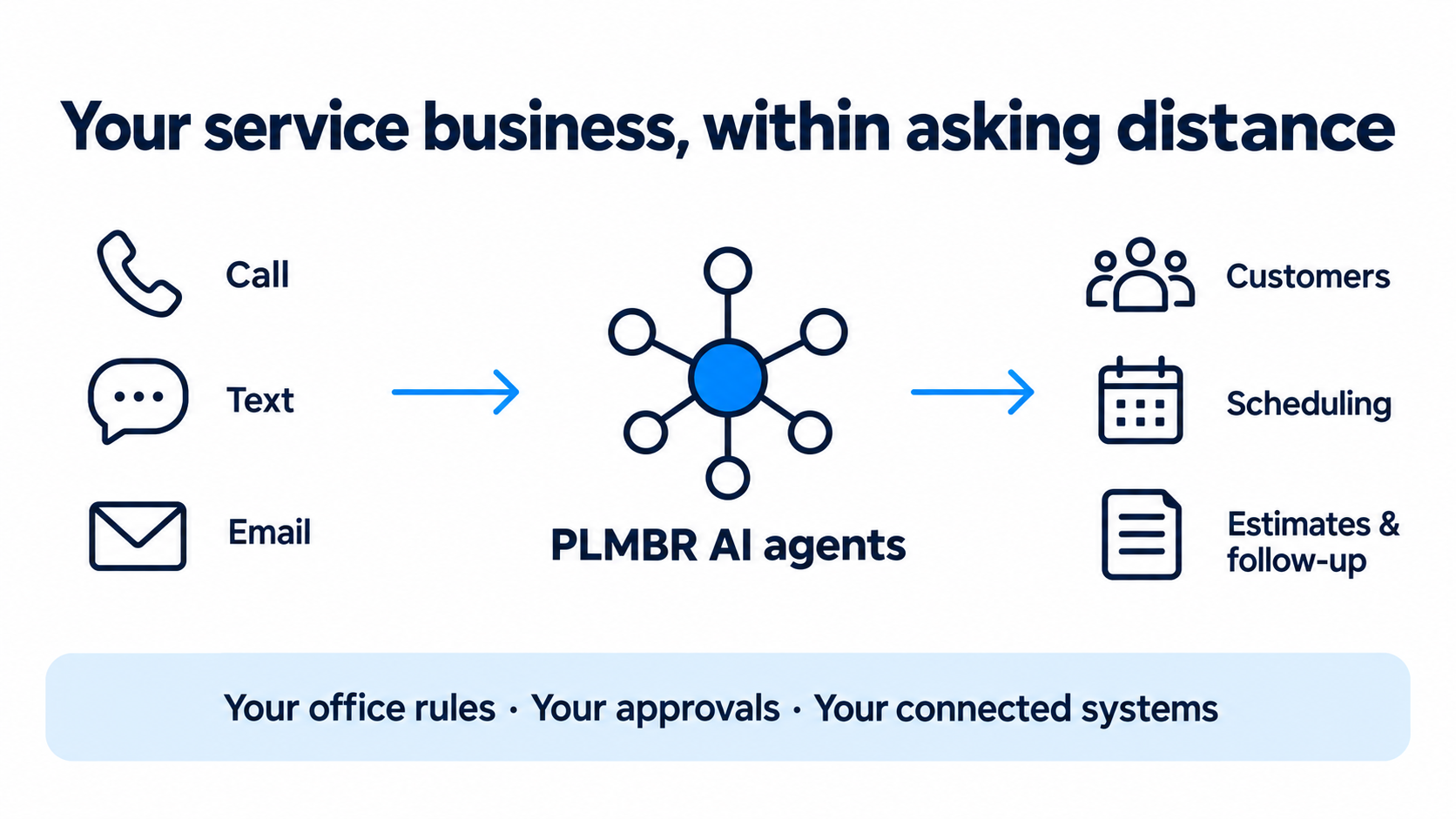
A conceptual illustration of the home service workflow. The operating scope and connected systems are configured for your business.
What Dalton Mills offers home service providers
Dalton Mills also serves home service businesses. It presents an AI platform for trades such as HVAC, roofing, and electrical, with tools that operators can adapt without writing code.
Its electrical offering includes a configured platform for proposals, pricing, scheduling and dispatch, customer management, and reporting. The page also describes automated initial lead response and the ability to extend workflows around the business.
That is a substantial offering. A fair comparison should give those existing capabilities credit. Its customization positioning does not mean a customer has to create every basic function from scratch.
PLMBR's case in this article centers on working with AI agents through everyday communication channels across the service operation. The decision is whether that approach fits the way your owner, office, and technicians want to work. Bring the same business requirements to both teams and ask them to demonstrate the complete task.
PLMBR vs. Dalton Mills at a glance
Use these starting points to organize your evaluation. The last column turns each area into something your office can actually inspect.
| What you are evaluating | PLMBR home service offering | Dalton Mills offering | What to inspect |
|---|---|---|---|
| How the team works with AI | Calls, texts, and email as ways to run operating tasks | An AI platform for trades, with tools adaptable without code | Give both teams an everyday office request and follow it through. |
| The service workflow | Customer conversations, scheduling, estimates, and follow-up | Proposals, pricing, dispatch, CRM, and initial lead response | Start with an inquiry and examine the next customer action. |
| Dispatch agents | Technician matching by trade, skill, availability, urgency, proximity, and office, with customer updates | Scheduling and dispatch with business-specific crew workflows | Change a technician's availability and inspect the assignment, customer update, and review history. |
| Fitting your business | Company rules, configured connections, and custom buildouts | Configured trade workflows with room to extend them | Bring a real exception from your service operation. |
| Keeping people in control | Permissions, approvals, and human takeover | Business-specific tools and workflow customization | Ask each team to show approval, correction, and escalation. |
Scroll to see all columns →
Sources: PLMBR home service operations, Dalton Mills platform, and Dalton Mills electrical workflows. These are published offerings; the table does not claim one vendor lacks a feature the other describes.
Follow one service call through the business
Consider an illustrative plumbing service request. A customer sends a photo of a water heater and asks about replacement. Your office needs enough information to decide the next step, the customer wants a useful response, and a technician needs a clear handoff.
Bring that example to both demos. Supply a sample customer message, the photo, your service area, appointment rules, an example estimate, and the situations that require an owner to step in. Use demonstration data, with no real customer information needed.
| Stage | Information your team supplies | Question for the demo | What a useful answer should make clear |
|---|---|---|---|
| Inquiry | The request, photo, and service area | How is missing information collected? | What is known, what is missing, and who owns the next action. |
| Appointment | Availability and appointment rules | How is a proposed visit reviewed and confirmed? | Whether the visit is proposed or booked, and what the customer is told. |
| Dispatch | Technician skills, availability, location, and office rules | How does the agent assign a technician and communicate the ETA? | The assigned technician, the reason for the choice, and the customer update. |
| Estimate | Example scope, pricing, and approval rules | Where can our office review and change the estimate? | Who approved the amount and what will reach the customer. |
| Follow-up | The customer conversation and your contact rules | How do we review the next message and stop it if needed? | The intended recipient, message, timing, and responsible person. |
Scroll to see all columns →
Then change one detail. Move the requested visit outside your service area, ask for an appointment your team cannot offer, or introduce an estimate that needs manager approval. The exception often reveals where your office needs a person to make the decision.
This is a demo exercise, not a claim that either product has completed this fictional job. Keep notes about what you saw, which steps needed configuration, and which questions remain open.
Your systems, your rules, your team
You may already use field service software, accounting tools, a business number, and shared inboxes. List those systems before the first conversation. Identify where customer records, appointments, estimates, and invoices should live, and who currently changes them.
PLMBR's Provider Enterprise offering includes configured connections and custom buildouts around an operation. Existing systems can remain in place. The supported connection method and permissions are established during onboarding; a named integration should be checked for the exact work your business needs.
Ask both vendors to walk through a small, defined launch. Choose the channels involved, name the people responsible for approvals, and agree on the result your team will review. Include a way to handle corrections and a clear route back to a person when a request needs judgment.
That preparation gives your office a concrete buying decision. You can assess the proposed setup against an actual service workflow, instead of hoping a broad feature list covers the difficult parts of your day.
Frequently asked questions
Is this comparison for general contractors or home service providers?
This comparison is for home service providers, including plumbing, HVAC, and electrical businesses. It focuses on customer conversations, technician dispatch, estimates, and the daily work of a service office.
Does Dalton Mills also have AI agents and automation?
Yes. Its platform describes AI for trades businesses, and its electrical page describes configured workflows and automated initial response. Evaluate the specific tasks you need both products to support.
Do we have to replace our current field service software?
PLMBR's home service offering supports working with existing systems through configured connections. Bring your current software and the records you need to exchange to the demo. Confirm the supported scope for your accounts before planning a change.
Can our team keep approval over important actions?
Yes. PLMBR's home service offering includes approval rules, permissions, and human takeover. Bring an action that should always require your review, and ask to see how your team controls it.
See PLMBR work with your service operation
If you want to run more of your home service operation through calls, texts, and email, start with a PLMBR demo built around your office's work. Bring a service inquiry, an estimate that needs attention, or an appointment change that keeps interrupting the day.
Book a PLMBR home service demo. Explore our home service AI offering or read more on the PLMBR blog.
Sources reviewed September 9, 2026: PLMBR Provider Enterprise, Dalton Mills platform overview, and Dalton Mills electrical offering.